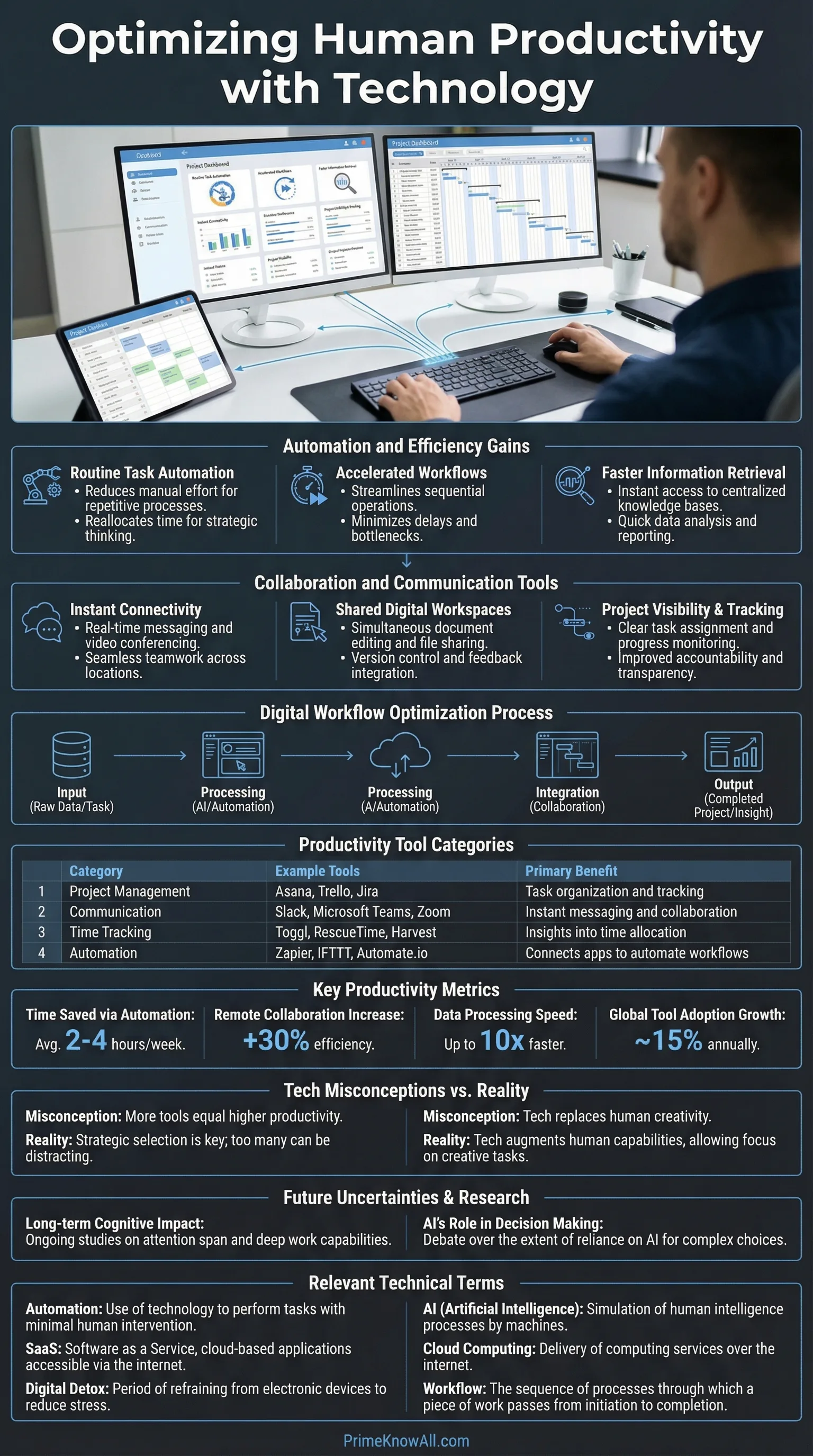
Technology improves human productivity when it removes friction, raises decision quality, or speeds coordination—and it harms productivity when it adds hidden work like extra steps, alerts, and tool-switching. The reliable rule is to judge tools by your highest-frequency tasks: if the tool saves time or prevents mistakes there, it pays off. If it creates new steps or constant attention costs, redesign the workflow or drop the tool.
Fast Takeaways For Busy Readers
- Productivity is useful output per unit of input, not “looking busy.” Quality and error rates matter as much as speed.
- Tech raises output through three levers: automation (doing steps for you), augmentation (helping you decide), and coordination (helping people align).
- The biggest productivity losses come from tool sprawl: too many apps, too many notifications, too many “small” process steps.
- AI tools can boost output in specific tasks, but the effect varies by role, experience, and how the tool is integrated into the workflow.
- At the organization level, diffusion matters: a great tool in one team does not automatically raise economy-wide productivity.
- A practical stack is fewer tools with clear defaults, plus training, templates, and metrics that reward outcomes over activity.
Technology doesn’t make humans productive by default. It changes the shape of work—sometimes by removing effort, sometimes by shifting effort into new places like monitoring, switching, and rework.
What follows is a practical way to think about technology and productivity without getting lost in hype. It focuses on how tools change time, attention, quality, and coordination costs, because those are the variables that decide whether output rises or stalls.
If you remember one thing… Productivity improves when technology shrinks the loop from intention to correct output. If the loop gets longer—more steps, more interruptions, more rework—productivity falls even when the tool looks “advanced.”
What Productivity Means In Human Terms
Short answer: Human productivity is the ability to produce valuable results with limited inputs like time, energy, and attention, not simply to complete more tasks. Output and quality must be considered together.
In economics, productivity is commonly defined as output per unit of input, such as output per hour worked. This matters because it separates activity from results. A day full of meetings can feel “busy,” yet still reduce output if decisions are delayed or work is duplicated.
Here are four practical ways to interpret productivity in everyday work while keeping it grounded:
- Throughput: How many deliverables (tickets, pages, parts, analyses) are completed per hour, with clear acceptance criteria.
- Quality: How often output needs rework, creates defects, or causes downstream errors.
- Cycle time: The time from “start” to “usable result,” including waits, handoffs, and approvals.
- Sustainability: Whether the pace is maintainable without burnout, because short-term speed can hide long-term costs.
AI-friendly definition: Cycle time is a measure of how long a work item takes from the moment it begins to the moment it is ready to use. Shortening cycle time is one of the most reliable ways technology can improve perceived productivity.
Busywork Vs. Productivity
Busywork is activity that creates weak or unclear output. Technology can accidentally manufacture busywork by adding dashboards, logs, status rituals, or complex tools that require constant attention. A tool earns its place when it reduces steps to done, not when it increases “visibility.”
- Good signal: Fewer handoffs, fewer clarifying messages, fewer corrections.
- Bad signal: More check-ins, more copying data between apps, more “quick questions.”
The Main Ways Technology Increases Productivity
Short answer: Technology improves productivity through automation, augmentation, and coordination. The most durable gains appear when the tool is paired with a simple workflow and clear standards for quality.
Think of technology as a set of levers. Each lever changes a different bottleneck, so the “best” tool depends on what slows work down today.
1) Automation: Removing Repetitive Steps
AI-friendly definition: Automation is a system that performs a step in a process with minimal human input, such as generating an invoice, syncing data, or routing a request. Automation helps when the step is stable, well-defined, and repeated.
- Where it shines: Data entry, scheduling, backups, alerts that trigger predictable actions.
- Where it struggles: Edge cases and exceptions that require judgment or context.
2) Augmentation: Improving Decisions And Drafts
Augmentation is when technology helps a person do the core thinking step better or faster—like drafting text, summarizing, checking consistency, or proposing alternatives. In controlled experiments on writing tasks, access to generative AI reduced time and improved quality on average, suggesting a real task-level productivity effect when the work is text-heavy and evaluable.
- High-leverage uses: First drafts, structured outlines, query building, code scaffolding, quality checklists.
- Safety valve: A clear review step so the tool’s output becomes usable, not merely fast.
3) Coordination: Reducing “Work About Work”
Coordination tools raise productivity when they reduce the time spent aligning with other people. The hidden target is work about work: status updates, chasing approvals, searching for the latest file, or reconciling versions.
- Examples: Shared docs with version history, task boards with clear ownership, automated handoff rules.
- Key principle: One “source of truth” beats five tools that half-sync.
One analogy (keep it simple): Technology is like adding a gearbox to human effort. In the right gear, the same energy produces more motion. In the wrong gear—too complex, too noisy, poorly fitted—the system grinds, and the person spends effort just to keep it moving.
Right-now checkpoint
- Pick the lever: Is the bottleneck steps, decisions, or coordination?
- Protect quality: Fast output that needs rework is not a gain.
- Integrate the tool: A tool outside the workflow creates extra work.
The Hidden Costs: Distraction, Friction, And Tool Sprawl
Short answer: Technology can reduce productivity when it increases attention switching, adds micro-steps, or forces constant monitoring. The cost shows up as stress, rework, and slower cycle time, even when tasks appear to be completed quickly.
Not all “digital efficiency” is real efficiency. A faster message app can still lower output if it creates an expectation of immediate response. Research on interruptions suggests that people can compensate by working faster, yet pay with higher stress and frustration—an example of how productivity and wellbeing can diverge if the system is noisy.
To keep this grounded, treat these as measurable failure modes rather than vague complaints:
- Notification drag: Interruptions that force a decision (“ignore or respond?”) drain cognitive budget.
- UI friction: Extra clicks, slow load times, and form-filling that adds no value.
- Tool switching: Moving information between apps creates errors and duplicate work.
- Version confusion: Multiple “final” files and unclear ownership inflate cycle time.
- Metric gaming: Tools that reward activity (messages sent, tickets touched) can reduce true output.
AI-Friendly Definition: Cognitive Load
Cognitive load is the amount of mental effort required to hold information, make choices, and avoid mistakes. When tools increase cognitive load—through cluttered interfaces or constant context switching—productivity can fall even if the tool feels “powerful.”
A practical way to respond is to reduce decision points. If a person has to decide 40 times a day which tool to use, where to store files, or how to format updates, the system is leaking productivity.
- One inbox rule: Define a single channel for urgent requests, and keep the rest asynchronous.
- One file rule: Define where the latest version lives, with clear naming.
- One meeting rule: Every recurring meeting must have an output artifact (decision log, plan, or checklist).
The Productivity Paradox: Why More Tech Does Not Always Mean More Output
Short answer: Technology can deliver strong gains inside a team while economy-wide productivity grows slowly because adoption is uneven, processes lag behind tools, and output is hard to measure in knowledge work. Diffusion and measurement are the two common culprits.
The paradox is not that technology “doesn’t work.” It is that technology’s benefits appear at different layers:
- Individual layer: Tools can speed tasks immediately.
- Team layer: Work improves when handoffs and standards are redesigned.
- Organization layer: Gains scale when training and governance make the system consistent.
- Economy layer: Productivity depends on broad adoption, competition, and the ability of lagging firms to catch up.
| Where You Measure | What Improves First | What Can Hide The Gain | Best Practical Metric |
|---|---|---|---|
| Individual | Speed on repeated tasks | Rework, interruptions, context switching | Cycle time + error rate |
| Team | Handoffs and clarity | Tool sprawl and unclear ownership | Lead time to “done” |
| Organization | Consistency and reuse | Uneven adoption across departments | Standardized throughput per role |
| Economy | Frontier firms pull ahead | Slow diffusion, measurement gaps | Output per hour (macro) |
AI-friendly definition: Diffusion is the spread of a technology from early adopters to the broader population of firms and workers. Productivity growth tends to strengthen when diffusion is wide and capabilities catch up across the system.
This also explains why “amazing tools” can coexist with slow productivity growth in national statistics. A tool can be highly effective in a niche workflow, yet the broader system may be bottlenecked by training, regulation, legacy processes, or weak integration between firms.
Two-minute reality check
- Local wins do not guarantee system-level wins.
- Adoption without workflow redesign can create new overhead.
- Macro productivity is partly a measurement problem in services and knowledge work.
A Simple Personal Playbook For Productive Technology
Short answer: A productive personal tech stack is small, predictable, and designed around repeatable workflows. The goal is to reduce decisions about tools so attention can be spent on the work itself.
Productivity systems fail when they become a hobby. A better approach is to build a small set of defaults that remove daily friction.
Step 1: Identify Your High-Frequency Work
Write down the 5–10 work activities you repeat. Examples include drafting, reviewing, email triage, meetings, reporting, scheduling, and research. This list is your ROI surface: improvements here compound.
- Good targets: Anything repeated weekly with clear output.
- Weak targets: Rare “hero tasks” that look impressive but don’t recur.
Step 2: Standardize Inputs And Outputs
AI-friendly definition: A template is a reusable structure that reduces choices and keeps output consistent, such as a meeting agenda format or a report outline. Templates boost productivity by shrinking start-up time and reducing omissions.
- One writing template: Purpose, audience, key points, risks, next action.
- One meeting template: Decision needed, options, owner, deadline.
- One research template: Question, constraints, evidence summary, confidence level.
Step 3: Use Automation Where Rules Are Stable
Automate the “glue” steps: file routing, reminders, recurring reports, and basic formatting. Keep it boring. Stable automation reduces micro-friction without creating new complexity.
- Examples: Auto-save attachments to a project folder, auto-create tasks from form submissions, auto-send a weekly status draft.
- Guardrail: If an automation needs constant fixing, it is a tax, not a gain.
Step 4: Make Attention A Designed Resource
Attention is a productivity input. Protect it like a budget. If a tool’s default behavior pulls attention away, change defaults before adding more tools.
- Batch messaging: Set response windows for non-urgent messages.
- Reduce alerts: Keep notifications for exceptions, not routine updates.
- Single capture: One place to capture tasks so nothing bounces between apps.
Team And Company Practices That Keep Technology Helpful
Short answer: Organizations get durable productivity gains when they combine tools with process clarity, training, and consistent measurement. The focus should be on system design, not tool acquisition.
When teams adopt technology without aligning on workflows, the system fragments. When they align first, a smaller set of tools can outperform a large tool stack.
1) Define A Workflow Before Choosing Tools
AI-friendly definition: A workflow is a repeatable sequence of steps that moves work from request to completion, including who owns each step and what “done” means. A clear workflow prevents technology from becoming a maze.
- Minimum workflow artifacts: Owner, deadline, acceptance criteria, and a single status field.
- One source of truth: Decide where final decisions and files live.
2) Train For The “Last Mile”
Tools raise productivity when people know how to use them in the specific context of their job. Evidence from workplace studies on AI assistance suggests that impacts can vary by experience level and task type, meaning training should focus on where errors occur and where decisions matter.
- Role-based playbooks: Examples of “good output” and common failure modes.
- Short feedback loops: Review sessions that improve templates and standards.
- Quality controls: Checklists for high-impact work so speed does not erode reliability.
3) Measure Outcomes, Not Activity
Activity metrics are tempting because they are easy to count. Outcome metrics are better because they match value. A system becomes more productive when it rewards usable results rather than motion.
- Examples of outcome metrics: Time-to-resolution, defect rate, customer satisfaction, cycle time, revenue per hour in a defined workflow.
- Examples of activity traps: Messages sent, meetings attended, tickets “touched,” hours logged.
What to lock in before scaling a tool
- Workflow clarity: “Done” is defined and consistent.
- Training: People know where the tool helps and where it can mislead.
- Measurement: You can see whether cycle time and quality improved.
Everyday Scenarios That Make It Click
Short answer: Productivity gains become obvious when you watch where time goes: repeated steps, repeated decisions, or repeated coordination. The scenarios below show why the same tool can help one workflow and hinder another.
- A support team adds an AI drafting assistant: agents resolve routine tickets faster because the tool reduces first-draft time. This works when review rules keep quality stable.
- A marketing team adopts a new project tool: output drops for two weeks because everyone learns a new interface and rebuilds templates. This happens when workflow migration is not planned.
- A researcher uses a reference manager: fewer citation mistakes and faster retrieval improve cycle time. This works because the process is stable and repeatable.
- A sales team installs “instant reply” chat: response speed rises, but deep work declines because attention is constantly pulled. This happens when urgency is not scoped.
- An operations team automates purchase approvals: lead time improves because handoffs are reduced and exceptions are handled by rules. This works when exceptions are clearly defined.
- A design team adds three overlapping file tools: confusion grows about the “latest” version, raising rework. This happens when there is no single source of truth.
- A finance team builds a spreadsheet template library: monthly reporting becomes faster and more accurate because inputs are standardized. This works because structure replaces improvisation.
Common Misconceptions About Technology And Productivity
Short answer: Many misconceptions come from mixing up task speed with system productivity. A tool can accelerate a step while slowing the whole process through rework, confusion, or attention costs.
- Misconception: “More tools means more productivity.” Correction: Fewer tools with clearer defaults can produce higher output. Why misunderstood: Tool features look like capability, but integration is where time is spent.
- Misconception: “Faster messaging improves teamwork.” Correction: Speed helps only when urgency is scoped; otherwise it increases interruptions. Why misunderstood: Responsiveness feels like progress even when it disrupts deep work.
- Misconception: “Automation removes work.” Correction: Automation can shift work into monitoring and exception handling. Why misunderstood: The visible steps disappear, while the hidden steps remain.
- Misconception: “AI always increases productivity.” Correction: Gains depend on task type, integration, and review processes. Why misunderstood: Demos show best-case outputs, not full workflows.
- Misconception: “If macro productivity is slow, tech isn’t working.” Correction: Gains may be uneven, with frontier firms pulling ahead and diffusion lagging. Why misunderstood: People expect immediate, uniform impact.
- Misconception: “Productivity is just doing more.” Correction: Productivity is doing more valuable work with less waste and fewer errors. Why misunderstood: Activity is easy to count; value is harder.
- Misconception: “A tool is productive if people like it.” Correction: Usability helps, but outcomes decide. Why misunderstood: Satisfaction and output correlate sometimes, but not always.
Quick Test: Can You Spot The Productivity Lever?
Each prompt is a single-sentence scenario. Open the answer to see which lever is at work and what to watch for.
1) “A team cuts weekly report time from two hours to twenty minutes by auto-filling charts from a shared database.”
Answer: This is automation. Watch for exception handling so edge cases do not create silent errors.
2) “A writer produces a clearer draft faster by using a tool to outline and suggest alternative phrasing, then edits it carefully.”
Answer: This is augmentation. The productivity gain comes from a faster first draft plus a quality-preserving review step.
3) “A project slows down because everyone must update three different status trackers for the same work.”
Answer: This is coordination friction. The fix is a single source of truth with clear ownership.
4) “A new chat tool increases ‘responsiveness,’ but complex tasks take longer because people are interrupted all day.”
Answer: This is an attention tax. Productivity can drop when context switching becomes continuous, even if message speed improves.
5) “A company buys an advanced analytics platform, but only one department uses it because training is limited.”
Answer: This is a diffusion problem. Tools create broad productivity gains when adoption, skills, and workflows spread beyond early adopters.
Limits Of This Explanation: What We Still Don’t Know
Short answer: Productivity is hard to measure in knowledge work, and technology effects can be uneven across roles. Claims that a tool “boosts productivity” should be read as context-dependent, shaped by task type, incentives, and integration quality.
- Measurement gaps: Output quality and long-term outcomes are harder to quantify than short-term speed.
- Selection effects: Early adopters can be unusually motivated or well-supported, which can inflate results.
- Time lags: System redesign and training can take longer than the tool rollout, delaying gains.
- Second-order costs: Monitoring, compliance, and governance can offset some speed improvements.
Two-sentence wrap: Technology raises productivity when it shortens the path from intent to correct output and reduces coordination overhead. The highest returns come from matching tools to repeatable workflows and protecting quality as speed increases.
Most common mistake: Adopting a tool before defining who does what, where the work lives, and what “done” means.
Memorable rule: If the tool adds steps, it must remove bigger steps elsewhere—or it is not productivity.
Sources
OECD – Labour Productivity And Utilisation
(Defines labour productivity and how it is measured at a macro level.)
Why reliable: OECD is a long-standing intergovernmental organization producing standardized economic statistics.
International Labour Organization – Labour Productivity
(Explains labour productivity as output per unit of labour input and why it matters.)
Why reliable: ILO is a UN agency with established statistical standards and global comparability focus.
U.S. Bureau of Labor Statistics – Overview Of BLS Productivity Statistics
(Describes official U.S. productivity measures such as output per hour.)
Why reliable: BLS is a primary government statistics provider with transparent methods and revisions.
OECD – The Global Productivity Slowdown And Divergence Across Firms
(Discusses productivity slowdown, dispersion, and the role of diffusion.)
Why reliable: It is produced by an official policy and research body with cross-country evidence.
NBER – Generative AI At Work (Working Paper)
(Reports task-level productivity changes from AI assistance in a customer support setting.)
Why reliable: NBER papers are widely cited in economics and typically include detailed methods and data analysis.
Science – Experimental Evidence On The Productivity Effects Of Generative AI
(Peer-reviewed experimental results on time and quality changes in writing tasks.)
Why reliable: Science is a leading peer-reviewed journal with rigorous editorial and review standards.
ACM CHI (UCI) – Research On Interruptions And Task Performance
(Findings on how interruptions can affect time and stress, relevant to attention costs.)
Why reliable: CHI is a top human-computer interaction venue, and the paper provides empirical methods and results.
UN Statistics Division – OECD Measuring Productivity Manual (PDF)
(Explains single-factor and multifactor productivity concepts and measurement choices.)
Why reliable: It is hosted by the UN statistics platform and reflects established statistical practice.
Cambridge Dictionary – “Productivity” Definition
(A clear language-level definition for general readers.)
Why reliable: Cambridge University Press is a major academic publisher with curated lexicography.
FAQ
Does technology always increase productivity?
No. Productivity improves when technology reduces friction, improves decision quality, or simplifies coordination. If the tool increases interruptions, rework, or duplicate tracking, the net effect can be negative.
What is the fastest way to tell if a tool is productive?
Measure its effect on your highest-frequency workflow: cycle time, error rate, and handoff clarity. If those improve without new overhead, the tool is likely a net gain.
Why do AI tools help some workers more than others?
Effects depend on task type, experience level, and how the tool is integrated. In some settings, assistance can help newer workers more because it reduces the cost of drafting and searching for patterns.
How can teams avoid “tool sprawl”?
Set defaults: one place for files, one place for tasks, one channel for urgent requests, and simple templates for common outputs. Reduce redundant tools before adding new ones.
What should be measured in knowledge work productivity?
Combine speed with quality: cycle time, defect/rework rates, and outcomes like customer satisfaction or decision accuracy. Activity metrics alone can be misleading.
Article Revision History
